
YOU'VE REGISTERED
WELCOME TO THE 2026 IAFP® SYMPOSIUM
We’ve been busy preparing another exceptional Symposium experience. Whether you’re joining from your office or home, you’ll have access to advanced education, expert speakers, valuable CE opportunities, and the conversations shaping financial planning today.
This page brings together everything you need to prepare for the virtual Symposium experience, including session information, the Whova app, technical tips, and helpful resources to ensure you’re ready before the first session begins.
Attending in person?
BEFORE THE SYMPOSIUM
GET SYMPOSIUM READY
DOWNLOAD THE WHOVA APP

The Whova app is your virtual Symposium hub. Use it to access live sessions, stay up to date with announcements, connect with fellow attendees, interact with speakers, and access important event information throughout the Symposium.
With Whova, you can:
- Watch hybrid sessions live
- View the agenda and session details
- Receive event updates
- Participate in Q&A and discussion
- Connect with fellow attendees
- Access important Symposium information
- Use to answer CE Credit polls
Tip: For the best experience, watch sessions on your computer while keeping the Whova app open on your phone or tablet so you can participate in discussions, ask questions, and network throughout the event.
Please note: The best virtual experience includes using both the Whova app and the Whova web platform. Watch sessions through the web platform and use the app to interact, network, and receive event updates.
REVIEW THE SYMPOSIUM CASE STUDY
This year’s Symposium case study provides the foundation for many of the discussions throughout the event.
Taking a few minutes to review it before the Symposium begins will help you follow the conversations more easily and connect the concepts to real-world financial planning scenarios.
CHOOSE YOUR BREAKOUT SESSIONS
This year’s Symposium includes breakout sessions designed to offer more focused learning and practical discussion. Smaller group settings allow for deeper conversation, more relevant examples, and a stronger opportunity to connect the content to your work with clients.
Participants can select one session per breakout time slot. Remaining sessions can be viewed at a later date.

TEST YOUR SETUP BEFORE DAY ONE
A few minutes of preparation can help ensure a smooth virtual experience.
Before the Symposium begins, we recommend that you:
- Test your internet connection
- Log in to Whova using the email address you registered with
- Confirm your computer’s audio and video settings
- Keep your device plugged in or fully charged
- Close unnecessary applications before joining live sessions
DURING THE SYMPOSIUM
MAKE THE MOST OF THE VIRTUAL EXPERIENCE
Virtual attendees are encouraged to participate throughout each session.
Use the Whova app to:
- ✓ Answer CE Poll questions
- ✓ Network with other attendees
- ✓ Receive announcements
- ✓ Participate in games and win prizes, etc
- The more you participate, the more you’ll get from the experience.
DON'T MISS THE KEYNOTE SESSIONS
The 2026 IAFP® Symposium features two keynote speakers exploring the human side of financial planning.

Dr. Moira Somers
will share insights into the psychology of money, advisor influence, and the behaviours that shape financial decision-making.
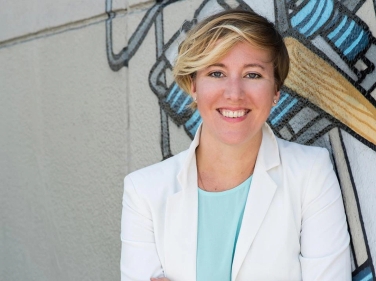
Dr. Meghaan Lurtz
will explore how better questions and stronger communication can lead to more meaningful client conversations and better planning outcomes.
Please note: David Chilton’s keynote and Dr. Meghaan Lurtz’s Saturday workshop, The Curiosity Connection: Active Listening Through Questions, are exclusive to the in-person Symposium experience and are not included in the virtual program.
EARNING CE CREDITS
To receive Continuing Education credits:
- Attend each eligible session in its entirety.
- Answer the Poll questions assigned to each session
(be sure NOT to click on the “Answer Anonymously” box or we cannot verify your attendance!)
Attendance is verified following the Symposium, and CE certificates will be emailed after the event.
If you are unable to watch a session during the live broadcast, you may watch the recording once it has been uploaded to the Whova app (within one week of the symposium). The same CE requirements apply to recorded sessions—you must watch the full recording and complete all poll questions included in the session.
Please note that partial viewing of a session or failure to answer the poll questions may result in CE credit not being awarded for that session.
Recordings will remain available in the Whova app until mid-December, allowing you plenty of time to complete any sessions you were unable to attend live.
USEFUL RESOURCES
FREQUENTLY ASKED QUESTIONS
HOW DO I ACCESS THE VIRTUAL SESSIONS?
All virtual sessions are accessed through the Whova app. We recommend logging in before the Symposium begins using the email address you registered with.
SHOULD I WATCH ON MY COMPUTER OR PHONE?
For the best viewing experience, we recommend watching sessions on your computer while using the Whova app on your phone or tablet to participate in discussions and networking.
DO I NEED TO CHOOSE BREAKOUT SESSIONS?
No. Virtual attendees do not need to select breakout sessions in advance.
HOW DO I EARN CE CREDITS?
Attend each eligible session in full and answer the poll questions for each session in the Whova app. Your attendance will be verified after the Symposium, and your CE certificate will be emailed to you.
CAN I WATCH SESSIONS LATER?
Yes. Virtual attendees are encouraged to join each session live as it is streamed during the symposium. However, we understand that scheduling conflicts and time zone differences may make it difficult to attend every session in real time. All live-streamed sessions will be recorded and uploaded to the Whova app within one week following the symposium. Once available, recordings may be viewed at your convenience and will remain accessible until mid-December, giving you ample time to catch up on any sessions you missed or revisit your favourites
WHO DO I CONTACT IF I NEED HELP?
For technical assistance before or during the Symposium, contact the Lead Event Planner at symposium@iafp.ca or use the Help section within the Whova app.